How to Spot the ‘Hot’ Leads: A Visual Guide to Your CRM’s Dashboard
Sohaira Zahra | October 13, 2025

Nearly 73% of businesses today use a CRM to accelerate their sales funnel and lead generation efforts. Yet, only 23% report facing no challenges throughout their sales lifecycle.
Something definitely feels off.
And while no one has publicly revealed why, we have every reason to believe it comes down to how they use the sales tools they already have. Even HubSpot seconds that.
So yes, we’re a little obsessed with uncovering what makes this 23% tick, and spoiler alert: it starts with their CRM.
Considering that most sales recruiters fall between ages 22 and 33, we’ll keep things practical, tech-savvy, and easy to follow (because you folks learn fast).
The number-one differentiator? The ability to instantly spot ‘hot’ leads amid a sea of cold ones right from the CRM dashboard.
So let’s start by getting to know that dashboard better.
What Is a CRM Dashboard?
A CRM dashboard is the visual control center of your sales and recruitment machine. You’ll see lots of charts, graphs, and real-time updates along with Kanban-style sales pipelines that live in one place.
If you have ever used Trello, Basecamp, or Jira-Confluence integration, you already know it from the inside out. Except that every CRM dashboard gets tweaked for the people and the company it’s built for.
For instance, here’s the Senegal Software dashboard:
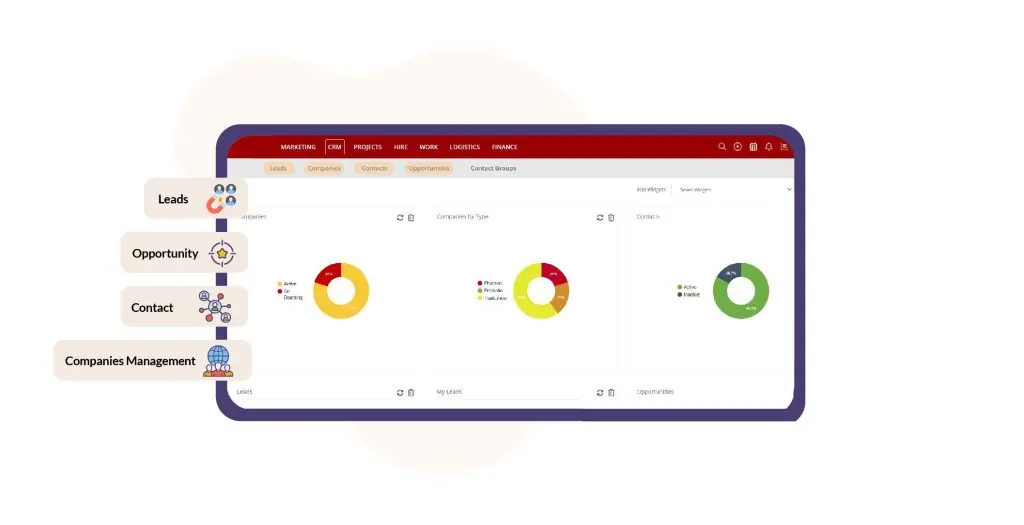
And since it was specifically developed for staffing firms, this means:
- You get instant visibility into candidate flows,
- Know which client opportunities are gaining momentum,
- And easily assign teams their tasks without digging through spreadsheets.
This way, with the right CRM dashboard, you can:
- Track lead sources,
- Monitor aging records,
- and prioritize outreach,
all at a glance. And over time, it becomes the difference between chasing folders and chasing results.
So you’ve got a dashboard; now we need to talk about hot leads and why they’re worth your focus.
What Is a Hot Lead in a CRM?
A hot lead is a prospect, either a candidate or client, who shows signs they’re ready to act. For them, you’ll see:
- High engagement: Recent follow-up, website clicks, or messages.
- Data completeness: Profile filled, skills or budget matched.
- Quick response or repeat interaction: They’ve replied or returned to you.
- Clear Intent: They show genuine interest, not just casually browsing.
All of these cues will add up, and your CRM dashboard will point that out. And there are three top reasons why you need to identify them fast.
Why Identifying Hot Leads Matters for Staffing Firms?
Identifying hot leads early means:

In a high-paced staffing market, the first recruiter to act on a hot lead often wins it. And now, we need to see how your CRM dashboard lets you pick them out quickly.
How Do You Track Hot Leads in a CRM?
While you know what a “hot lead” is, the CRM dashboard is where that heat shows up. Below, we’ll walk you through the three visual signals every recruiter should watch for:
- Lead scores and color-coding,
- Pipeline movement, and
- Engagement data like email opens, calls, & meetings.
These are the tiny nudges that tell you who to call first in the lead management process.
Don’t Just View Leads. Prioritize Them Smartly!
Start your free 14-day trial with Senegal Software and experience how automated lead scoring and visual dashboards make identifying ‘hot’ leads faster, smarter, and delightfully effortless.
Top 3 Visual Indicators of Hot Leads in CRM Dashboards
1. Lead Scores and Color Coding
Lead scores translate messy data into a single, actionable number. Most CRMs use color cues:
- Green for hot,
- Amber for warming,
- Red/gray for cold.
This way, recruiters can scan a board and instantly pick priorities. Scores are typically built from fit, like role & seniority, and behavior, like pages visited & forms filled.
When used consistently, lead scoring reduces guesswork and speeds first contact by up to 2 weeks.
Here’s what to watch for:
- High numeric score + green badge = immediate outreach
- Sudden score spikes (e.g., recent downloads or repeated visits) = re-prioritize now
- Score decay over weeks = move to nurture
Just remember that no lead is worth abandoning. It might not be ready just yet, but that doesn’t mean it’s hopeless. Let your CRM nurture it till it pops up as a hot lead.
2. Pipeline Stage Progression
A lead’s movement across stages, i.e.,
— New → Contacted → Qualified → Interviewing → Offer —
It is a visual heartbeat of your entire lead management process. Fast upward movement signals momentum; long dwell time in one stage shows a blockage.
CRM dashboards that surface average stage time help managers spot bottlenecks before deals cool. You can use stage-time filters during daily standups to fix these slow spots.
Pro-Tip: Flag any lead stuck longer than your SLA (e.g., 48–72 hours) for immediate review.
3. Engagement Metrics Like Emails Opened, Calls Logged, & Meetings Booked
Engagement is behavioral proof that a lead is interested. Track opens, clicks, reply rates, call duration, and booked meetings, then combine them with the score and stage.
Email benchmarks (such as open/click norms) give context: a high open rate in your industry suggests genuine interest and should bump the lead up the queue.
Here are some fast rules for recruiters:
- If a lead opens 3+ emails or books a meeting in 48 hours → call now.
If calls are logged but no meetings booked → send a calendar link and a short value note.
If engagement falls but the score is high → trigger a nurture sequence, not abandonment.
These visual cues of lead scoring, pipeline stages, and lead engagement form a triage system. Read them together, and your CRM dashboard will tell you exactly who to call, email, or chase next.
Now that you’re familiar with the visual tracking of hot leads, it’s time to zoom out and look at the essentials of a recruiter’s dashboard.
Yes, we’re talking about a bird’s-eye view of what’s needed in a dashboard that connects both candidate and client tracking in one interface.
What Should a Recruitment Dashboard Include?
A well-built recruitment dashboard will offer you more than pretty charts; it will be your decision-making tool that aligns your staffing team. According to NetSuite, Pipedrive, & Bullhorn, the top recruiting dashboards include metrics like time-to-fill, candidate source, and job funnel efficiency.
But we have jotted down the ones that will help you track hot leads better.
1. Candidate vs. Client Tracking Views
On one side, you’re monitoring candidates with applicant flow, interview stages, and offers made. On the other hand, you’re tracking client portals with active job orders, client leads in the pipeline, and the placements made.
Having both views side-by-side means no blind spots.
Key Metrics to Display in Recruitment CRM Dashboards
So make sure your dashboard hits the following essentials:
- Active jobs and unfilled roles
- Hot candidate leads, all scored with recent engagement metrics
- Client leads, including data on new inquiries & proposals sent
- Time-to-fill per role with source performance & KPIs
Given how this is a visual staffing guide, let’s see how all of these essentials look in Senegal Software.
Senegal CRM Recruitment Dashboard Features
With CRM staffing, you get:
- Preconfigured widgets for candidate and client tracking
- Real-time updates on active jobs and high-scoring leads
- Dual views so recruiters and sales staff work from the same dashboard
Together, these dashboard features give your team the context they need, so you can act on leads and jobs in sync, not separately.
And now that your CRM dashboard is set up, the next stop is how you make lead scoring & lead routing even simpler.
How CRM Dashboards Make Lead Tracking & Lead Scoring Simpler
Dashboard signals gave you the visual cues, but that alone isn’t enough. You must turn those cues into streamlined action for leads to become long-lasting partnerships.
Lead tracking made simple means your dashboard not only shows leads, but it also automatically ranks and routes them to an appropriate sales rep based on behavior, data, and intent.
Think of it this way: lead tracking gives you the ‘what and when,’ and your dashboard turns it into ‘who next and how.’
Rules-based vs AI & Predictive Lead Tracking
With rules-based tracking, you set explicit filters and tags. These can be:
- “Has filled profile + clicked email = high priority,”
- “Has > 3 job views = tag hot,”
- “Has > 2 website clicks + sent a chatbot query = follow up next.”
It’s transparent and fast to implement.
In contrast, AI-based predictive tracking uses patterns from past conversions, such as:
- Behavior sequences,
- Content interactions,
- Response timing, etc.
To rank leads automatically.
Both methods work, but predictive adds the “how many times” and “how soon” dimensions that your rules can’t easily model.
Here are some quick ways you can set up automatic lead scoring and lead routing in your own CRM dashboard.
How to Set up Filters, Tags & Lead Automation in Your CRM Dashboard
There are probably a hundred ways to do this, but here’s the easiest one:
- Step 1: Start by using filters like “Lead score ≥ 70” or “Tagged ‘job-change’ in last 48h” to create high-urgency lists.
- Step 2: Then apply tags such as “new job board lead,” “referral,” or “client inquiry.” Tags help segment quickly.
- Step 3: Finally, set automations to route these filtered, tagged leads directly to senior recruiters or initiate a follow-up workflow.
This quick but highly efficient process ensures a lead flagged hot doesn’t sit idle, so that your team gets it now. Here at Senegal Software, our fresh recruiters actually use the same process, but without doing anything.
How Senegal Software Automates Lead Tracking & Routing
Because in Senegal CRM, your dashboard will auto-highlight leads above a threshold score and with recent activity. The system uses either your rules logic or built-in predictive patterns, then filters and tags automatically to present a live “top-priority” queue.
Your team sees who to call, email, or schedule next, all without digging through spreadsheets. And fresh recruiters find this handy, as they don’t have to learn how to set their own rules or take time fixing rookie mistakes.
Top 3 Best Practices for Staffing Firms When Setting Up CRM Dashboards
Now that your dashboard is picking up, filtering, and ranking leads, it’s time to align your team behind it. Here are the top three tried-and-tested ways.
1. Customize Dashboards to Focus on KPIs
Dashboards disappear into noise when they show everything.
Instead, staffing firms should concentrate on the metrics that drive placements, like:
- Active jobs,
- Candidate flow,
- Client leads,
- Time-to-fill,
- And conversion rates.
By customizing views per role for recruiter, account manager, & sales lead, everyone sees what matters most.
2. Use Visuals for Faster Decision-Making
Charts, color bars, and heat maps aren’t just pretty; they’re essential. Visuals help your team spot weaknesses at a glance and look for:
- Backlog jobs,
- Inactive high-scoring leads,
- Or client inquiries,
stalled longer than your SLA.
3. Train Recruiters to Act on Dashboard Insights
You’ve built the dashboard; now make sure your team uses it and knows how to.
Training should focus on interpreting signals and taking action. Say, “If the lead score hits 80 and +2 meetings are booked, call within 30 min.” Set rules and accountability so the board becomes your team’s daily navigator and not just another nice graphic.
By customizing your interface, using visuals that punch, and training recruiters to react, your dashboard transforms from a data display into a deals-closing engine.
Wrap-Up: Modern CRM Dashboards Must Combine Your Interface, Pipeline, & Results in One Place
You’ve seen how a CRM dashboard isn’t just a dashboard; it’s the command center of your staffing game. From recognizing what makes a lead hot to visual signals, tracking, filtering, and prioritizing, it all adds up to smarter staffing.
And Senegal Software Happens to Offer One
With Senegal Software, your leads, clients, candidates, and analytics all live right where they should: in one smart, customizable dashboard.
Yes, no endless tab-hopping, no data silos, just a clean visual workspace built for recruiters who want to spend more time closing deals than decoding spreadsheets.
And you just saw every bit of it visually.

Don’t Just View Leads. Prioritize Them Smartly!
Start your free 14-day trial with Senegal Software and experience how automated lead scoring and visual dashboards make identifying ‘hot’ leads faster, smarter, and delightfully effortless.


